
IAM vs Active Directory: What's the Difference?
Captverse · August 22, 2026 · 12 min read
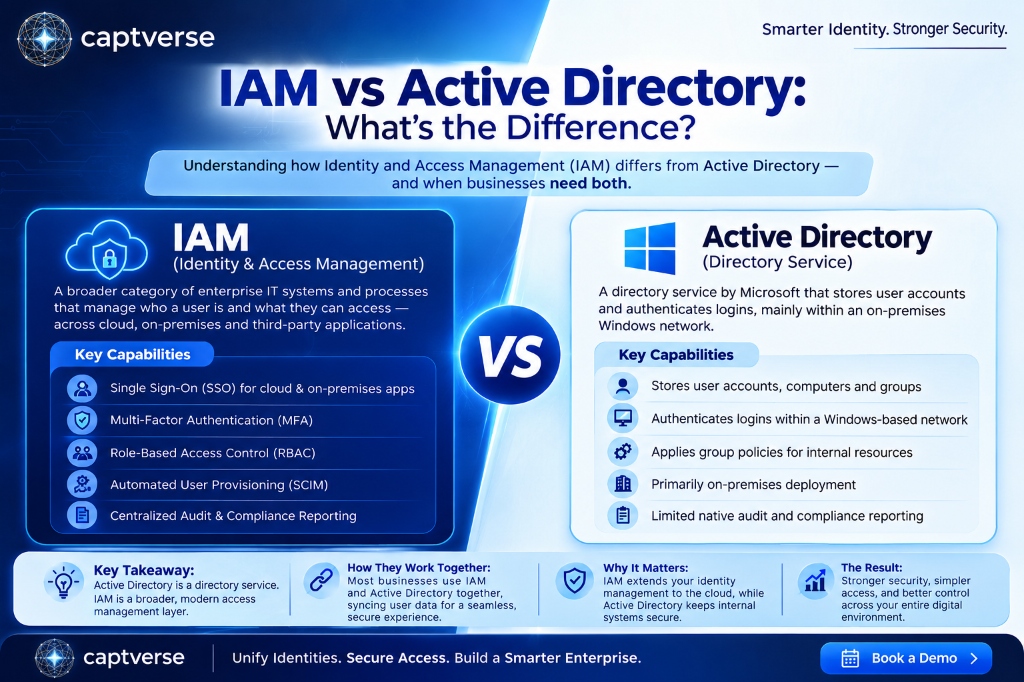
Identity and access management (IAM) and Active Directory are often mentioned together, but they solve different parts of the same problem. Active Directory is a directory service that stores user accounts and authenticates logins, mostly within an on-premises Windows network. IAM is a broader category of enterprise IAM tools that manage authentication, authorization, and access across cloud applications, on-premises systems, and third-party services. This guide explains what each one does, where they overlap, and how businesses typically use both together rather than choosing one over the other. It also covers the limitations of relying on Active Directory alone and a framework for deciding what a business needs next.
Key Takeaways
- Active Directory is a directory service built for on-premises Windows environments, while IAM is a broader category that manages access across cloud and on-premises systems.
- Active Directory alone does not provide modern single sign-on (SSO), multi-factor authentication (MFA), or SCIM provisioning for cloud applications without add-on tools.
- Enterprise IAM platforms typically layer on top of or alongside Active Directory rather than replacing it outright, especially in hybrid environments.
- Businesses comparing IAM vs Active Directory are usually deciding how to extend identity management to cloud applications, not choosing to abandon their directory service.
- Credential-based attacks remain a leading cause of data breaches, making the gap between legacy directory services and modern access controls a real business risk.
- A hybrid approach, syncing Active Directory with a cloud IAM platform, is the most common setup for mid-size and enterprise organizations today.
- Choosing between IAM and Active Directory extensions depends on cloud adoption, compliance needs, and how many applications require centralized access control.
What Is IAM (Identity and Access Management)?
Identity and access management (IAM) is a category of enterprise IAM systems and processes that verify who a user is and control what they can access across applications, systems, and data. IAM covers authentication (confirming identity), authorization (defining permissions), and administration (managing accounts over their lifecycle).
Enterprise IAM platforms typically include single sign-on (SSO), multi-factor authentication (MFA), role-based access control (RBAC), and automated user provisioning. These platforms are built to manage identity across cloud applications, on-premises systems, and third-party services from one console, regardless of where each application is hosted.
IAM is a category, not a single product. Many businesses combine several tools, an identity provider for SSO, a directory for user records, and an access management layer, to build a complete IAM strategy.
What Is Active Directory?
Active Directory (AD) is a directory service developed by Microsoft that stores information about users, computers, and groups, and authenticates logins within a Windows-based network. It has been the standard identity infrastructure for on-premises enterprise environments since it was introduced in 2000.
When an employee logs into a company laptop or accesses a file server, Active Directory typically handles that authentication in the background. AD organizes users into domains and applies group policies that control settings like password requirements and access to internal resources.
Active Directory was built before cloud applications were common, so its native capabilities focus on on-premises resources. Microsoft's cloud-based identity service, Entra ID (formerly Azure AD), extends similar functionality to cloud environments, but it is a separate product with a different architecture.
IAM vs Active Directory: What Is the Core Difference?
The core difference in the IAM vs Active Directory comparison is scope: Active Directory is a directory service focused on authenticating users within an on-premises Windows network, while IAM is a broader category that manages access across cloud applications, on-premises systems, and third-party services. Active Directory answers "who is this user," while a full IAM strategy also answers "what should this user be allowed to do, everywhere they work."
This distinction matters because many businesses assume Active Directory alone qualifies as identity and access management. It handles authentication for internal systems, but it does not natively provide SSO across cloud applications, enforce MFA for every login, or automate provisioning for third-party SaaS tools without additional software.
| Factor | Active Directory | IAM (Enterprise Platform) |
|---|---|---|
| Primary scope | On-premises Windows network | Cloud, on-premises, and third-party applications |
| Native SSO for cloud apps | Not included by default | Included as a core feature |
| MFA support | Requires add-on tools | Typically built in |
| User provisioning | Manual or scripted | Automated, often via SCIM |
| Deployment model | On-premises servers (domain controllers) | Cloud-hosted, on-premises, or hybrid |
| Audit and compliance reporting | Limited without extensions | Centralized audit logs and exportable reports |
How Does Active Directory Fit Into an IAM Strategy?
Active Directory fits into an IAM strategy as the identity source for on-premises resources, often synced with a cloud IAM platform so both systems share the same user records. Rather than being replaced, Active Directory frequently becomes one input into a larger identity management setup.
A common pattern looks like this: Active Directory manages internal network authentication, while a cloud IAM platform handles SSO and MFA for cloud applications like CRM, finance, or collaboration tools. Directory synchronization tools connect the two, so a new employee created in Active Directory automatically gains access to approved cloud applications without a second manual setup step.
This hybrid model exists because most enterprises did not build their infrastructure from scratch. They added cloud applications over time while keeping Active Directory for internal systems, resulting in identity data that needs to be shared between both environments accurately.
Why Do Businesses Compare IAM vs Active Directory?
Businesses compare IAM vs Active Directory because they are usually deciding how to extend identity management to cloud applications, not choosing to abandon their existing directory service entirely. The comparison becomes relevant as a company adopts more SaaS tools that Active Directory was never designed to manage directly.
A manufacturing company, for example, might have Active Directory managing logins for its internal ERP system and shop floor terminals for years. As the same company adopts a cloud-based CRM and a separate payroll platform, employees end up with separate logins for each cloud tool, since Active Directory does not extend to them automatically.
Credential-based attacks make this gap a business risk, not just an inconvenience. According to Verizon's 2025 Data Breach Investigations Report, stolen or compromised credentials were involved in 22% of breaches analyzed, and exploitation of known vulnerabilities in unpatched systems, including aging on-premises infrastructure, accounted for roughly 20% of breaches [1]. Businesses running Active Directory without additional access controls are exposed to both risks at once.
What Are the Limitations of Using Active Directory Alone?
Active Directory alone has several limitations for businesses that rely on cloud applications, since it was not built to manage authentication outside an on-premises Windows network. These gaps typically surface as a company grows or adds more cloud-based tools.
- No native SSO for cloud apps: Active Directory does not automatically extend single sign-on to SaaS applications without connecting to a separate identity provider.
- Limited MFA enforcement: Multi-factor authentication is not built into standard on-premises Active Directory and usually requires third-party add-ons.
- Manual provisioning for external tools: Creating and removing accounts in cloud applications still requires separate steps unless connected through SCIM or a similar protocol.
- On-premises dependency: Traditional Active Directory relies on domain controllers hosted on company infrastructure, which can create a single point of failure if not properly maintained.
- Weaker audit trails for compliance: Producing a unified access report across both internal and cloud systems is difficult when Active Directory only tracks internal activity.
- Aging attack surface: Active Directory has been a frequent target for ransomware and credential-based attacks, partly because so many organizations still run it with known configuration gaps.
What Are the Benefits of Enterprise IAM Compared to Active Directory Alone?
Enterprise IAM platforms extend what Active Directory alone can do by adding centralized SSO, built-in MFA, automated provisioning, and audit reporting across every connected application, not just internal systems. These capabilities address the specific gaps businesses run into as they adopt more cloud tools.
- Single login across cloud and on-premises apps: Employees authenticate once through a central identity provider instead of maintaining separate credentials for each system.
- Built-in multi-factor authentication: MFA is typically a core feature, not an add-on, reducing setup complexity.
- Automated provisioning through SCIM: New employees gain access to approved applications as soon as their account is created, and access is removed automatically when they leave.
- Centralized compliance reporting: Audit logs cover every connected application in one place, making compliance reviews faster.
- Support for modern protocols: Enterprise IAM platforms are typically built around SAML 2.0 and OpenID Connect (OIDC), which most current cloud applications support natively.
- Scalability across business units: Adding a new application or acquiring another company is easier when identity is centralized rather than duplicated across multiple directories.
Can Businesses Use Both IAM and Active Directory Together?
Yes, most mid-size and enterprise businesses use Active Directory and a cloud IAM platform together, syncing user data between the two rather than replacing one with the other. This hybrid setup is the most common configuration in real-world enterprise environments today.
In this model, Active Directory continues to manage authentication for internal, on-premises resources such as file servers and legacy applications. A cloud IAM platform handles SSO, MFA, and access control for SaaS applications, with directory synchronization keeping user records consistent across both systems.
A banking organization, for instance, might keep core banking software running on Active Directory-authenticated servers for regulatory and legacy reasons, while using a cloud IAM platform to manage SSO and MFA for its customer relationship management and internal collaboration tools. Both systems operate together instead of competing.
How Should Businesses Decide Between IAM and Active Directory Extensions?
Businesses should decide between extending Active Directory and adopting a broader enterprise IAM platform based on how many cloud applications they run, their compliance requirements, and how much manual provisioning work their IT team currently handles. A structured evaluation helps avoid under-investing or over-building the identity stack.
- Count the cloud applications in use. If employees log into five or more cloud tools, manual account management likely creates measurable IT overhead.
- Review current MFA coverage. Confirm whether MFA is enforced consistently across all systems or only on some.
- Assess provisioning workload. Estimate how much time IT spends manually creating and removing accounts across systems each month.
- Check compliance reporting needs. Determine whether auditors or regulators require centralized, exportable access logs.
- Evaluate growth plans. Consider whether the business expects to add more cloud applications, acquire other companies, or expand into new regions soon.
- Confirm protocol compatibility. Verify that a prospective IAM platform supports SAML 2.0, OIDC, and SCIM, so it can connect to both Active Directory and existing cloud applications.
How CaptIdentity Helps Businesses Modernize Beyond Active Directory
Businesses that want to extend identity management beyond what Active Directory provides on its own can use CaptIdentity, an identity management platform built around SSO, MFA, and automated provisioning. CaptIdentity supports SAML 2.0 for connecting cloud applications and SCIM 2.0 for automated user provisioning, so it can work alongside an existing Active Directory environment rather than requiring a full replacement.
For businesses running a mix of on-premises and cloud systems, CaptIdentity adds role-based access control and a centralized audit trail that logs logins, permission changes, and API activity across every connected application. This gives IT and compliance teams one system for cloud access control, while Active Directory continues to manage internal, on-premises resources.
Best Practices for Migrating from Active Directory to Enterprise IAM
A successful transition from relying solely on Active Directory to a broader enterprise IAM setup depends on planning the integration in phases rather than attempting a full replacement at once. Most businesses extend Active Directory rather than retiring it immediately.
- Start by connecting your highest-risk or most-used cloud applications to SSO first, rather than migrating everything simultaneously.
- Keep Active Directory as the source of truth for internal, on-premises resources unless there is a specific reason to migrate them.
- Set up directory synchronization early, so user records stay consistent between Active Directory and the IAM platform.
- Enforce MFA across both environments during the transition, not just on newly connected applications.
- Document which applications are connected to the new IAM platform and which still rely solely on Active Directory.
- Review audit logs from both systems on a regular schedule until reporting is fully centralized.
- Train IT staff on the new provisioning workflow before turning off any manual processes.
FAQ
Is Active Directory the same as IAM?
No, Active Directory is a directory service focused on authenticating users within an on-premises Windows network, while IAM is a broader category that manages access across cloud, on-premises, and third-party systems. Active Directory can be one part of an IAM strategy, not a full replacement for it.
Do businesses need to replace Active Directory to adopt IAM?
No, most businesses keep Active Directory for internal, on-premises resources and add a cloud IAM platform for SSO, MFA, and cloud application access. Directory synchronization connects the two systems instead of requiring a full migration.
Can Active Directory support single sign-on for cloud applications?
Active Directory does not natively provide single sign-on for cloud applications without connecting to a separate identity provider or a service like Microsoft Entra ID. Businesses typically add a cloud IAM platform to extend SSO beyond the internal network.
What is the biggest risk of relying only on Active Directory?
The biggest risk is a gap in security coverage for cloud applications, since Active Directory does not enforce MFA or centralized audit logging outside the on-premises network by default. This leaves cloud accounts more exposed to credential-based attacks.
How long does it take to connect Active Directory to an IAM platform?
Timelines vary by company size, but directory synchronization for a mid-size business typically takes a few weeks, covering setup, testing, and a phased rollout across departments. Larger, more complex environments can take longer depending on the number of connected applications.
Conclusion
Active Directory and IAM are not competing choices. Active Directory remains the standard for authenticating users within an on-premises Windows network, while enterprise IAM platforms extend that identity management to the cloud applications, MFA requirements, and compliance reporting that Active Directory alone does not cover.
Most businesses end up running both together, syncing Active Directory with a cloud IAM platform rather than replacing one with the other. The right next step depends on how many cloud applications a business runs, its compliance requirements, and how much manual provisioning work its IT team currently handles. Platforms such as CaptIdentity are built to work alongside Active Directory, giving businesses a practical way to extend identity management to the cloud without a disruptive migration.
Modernize Identity Without Replacing Active Directory
Book a demo to discover how CaptIdentity helps organizations secure cloud applications, automate user provisioning, and simplify compliance while continuing to use Active Directory for on-premises authentication.
References
- Verizon, 2025 Data Breach Investigations Report.