
SCIM Provisioning Explained: Automating User Lifecycle Management
Captverse · August 24, 2026 · 12 min read
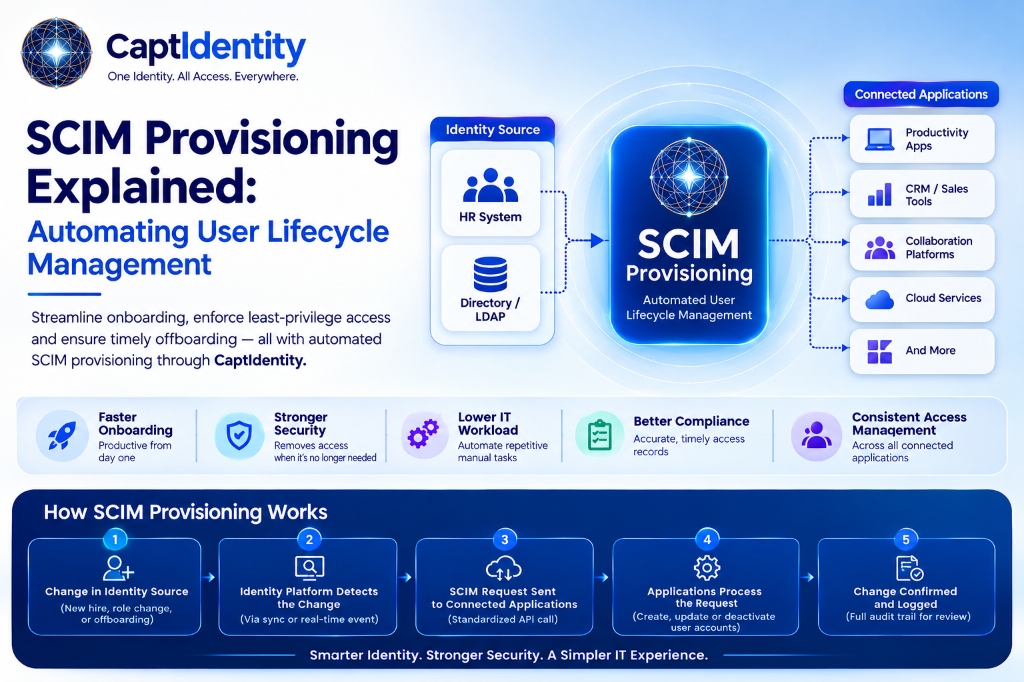
SCIM provisioning is the process of automatically creating, updating, and removing user accounts across connected applications using the System for Cross-domain Identity Management (SCIM) protocol. Instead of IT staff manually adding or removing access in each application, SCIM provisioning syncs user accounts from a central directory to every connected system. This guide explains how the SCIM protocol works, why manual user provisioning creates security and compliance risk, and how automated identity lifecycle management reduces both. It also covers common use cases, implementation challenges, and a framework for evaluating SCIM support when choosing an identity platform.
Key Takeaways
- SCIM provisioning automates account creation, updates, and removal across every connected application from a central directory.
- The SCIM protocol defines a standard format for exchanging user and group data between an identity provider and connected applications.
- Manual user provisioning is slower, more error-prone, and leaves former employees with active access longer than automated provisioning does.
- SCIM provisioning is a core part of identity lifecycle management, covering the full span from onboarding to role changes to offboarding.
- Businesses in regulated industries rely on SCIM provisioning to produce accurate, timely access records for compliance reviews.
- Credential-related risk remains a leading cause of data breaches, making automated deprovisioning a measurable security control, not just a convenience.
- Evaluating SCIM support means checking protocol compliance, application coverage, and how deprovisioning actually behaves, not just whether a vendor claims support.
What Is SCIM Provisioning?
SCIM provisioning is the automated creation, modification, and removal of user accounts across connected applications, driven by changes in a central identity source such as an HR system or directory. When an employee joins, changes roles, or leaves, SCIM provisioning applies that change to every connected application without manual data entry.
For a business, this means a new hire in the HR system can automatically receive accounts in email, CRM, and collaboration tools on their start date. When that same employee leaves, SCIM provisioning removes their access from every connected application at once, instead of relying on IT to update each system separately.
SCIM provisioning matters because manual account management does not scale. As a company adds cloud applications, the number of accounts each employee needs grows, and so does the risk of a step being missed during onboarding or offboarding.
What Is the SCIM Protocol?
The SCIM protocol (System for Cross-domain Identity Management) is an open standard that defines a common format for exchanging user and group information between an identity provider and connected applications. It specifies how to represent user attributes, such as name, email, and role, and how to create, update, or deactivate accounts through a standardized API.
Before SCIM, each application often required a custom integration to sync user data, since every vendor structured account information differently. The SCIM protocol solves this by giving identity providers and applications a shared format, so one integration pattern can work across many systems.
Most enterprise applications built in the last decade support SCIM 2.0, the current version of the protocol. This is why SCIM has become the standard method for automated user provisioning in modern IAM platforms.
Why Do Businesses Need Automated User Provisioning?
Businesses need automated user provisioning because manual account management does not keep pace with how many applications employees use, leaving gaps in both security and compliance. A growing company might add a new cloud application every few months, each one requiring its own account setup process if provisioning is not automated.
The onboarding side of this problem slows employees down. A new hire who cannot access their email, CRM, or project management tool on day one loses productive time, and IT staff lose time manually creating each account across multiple systems.
The offboarding side carries more risk. When account removal depends on someone remembering to update every system, former employees often retain access longer than they should. According to Verizon's 2025 Data Breach Investigations Report, stolen or compromised credentials were involved in 22% of breaches analyzed, and unused or forgotten accounts are a common source of exactly this kind of exposure [1]. Automated user provisioning closes that gap by removing access the moment a change is recorded in the central identity source.
How Does SCIM Provisioning Work?
SCIM provisioning works by connecting a central identity source, such as an HR system or directory, to every application through the SCIM protocol, so account changes flow automatically instead of requiring manual updates in each system. The process follows a consistent pattern across most identity platforms.
- A change occurs in the identity source. An HR system or directory records a new hire, a role change, or a termination.
- The identity platform detects the change. The IAM platform monitors the identity source for updates through a scheduled sync or a real-time event.
- A SCIM request is sent to each connected application. The platform sends a standardized SCIM API call to create, update, or deactivate the account.
- The application processes the request. The connected application creates the new account, updates attributes like role or department, or disables access.
- The identity platform confirms the change. Successful and failed provisioning actions are logged for review, so IT can confirm every application updated correctly.
This automated flow replaces a manual checklist with a system that applies the same change everywhere at once, reducing the chance that one application gets missed.
What Are the Benefits of SCIM Provisioning for Identity Lifecycle Management?
SCIM provisioning improves identity lifecycle management by making onboarding faster, offboarding more complete, and account data more accurate across every connected application. These benefits apply at every stage of an employee's time with a company, not just at hiring or departure.
- Faster onboarding: New hires gain access to approved applications automatically, often on their first day, without IT manually creating each account.
- Complete offboarding: Access is removed from every connected application at once when an employee leaves, closing the gap that manual processes often leave open.
- Accurate role changes: When an employee changes departments or roles, SCIM provisioning updates their access and permissions across connected systems to match.
- Reduced IT workload: Automating account creation and removal frees IT staff from repetitive manual tasks across dozens of applications.
- Better compliance records: Provisioning and deprovisioning events are logged automatically, giving compliance teams accurate access records without manual tracking.
- Fewer orphaned accounts: Automated deprovisioning reduces the number of unused accounts tied to former employees, a common target for credential-based attacks.
SCIM Provisioning vs Manual Provisioning: What Is the Difference?
The core difference between SCIM provisioning and manual provisioning is where the work happens: SCIM provisioning applies account changes automatically across every connected application, while manual provisioning requires IT staff to update each system individually. This difference affects speed, accuracy, and security exposure.
| Factor | Manual Provisioning | SCIM Provisioning |
|---|---|---|
| Onboarding speed | Hours to days per employee | Minutes, applied automatically |
| Offboarding completeness | Depends on IT remembering every system | Applied to all connected applications at once |
| Risk of missed accounts | Higher, especially across many applications | Lower, since one change triggers all updates |
| Audit trail | Manual tracking, often incomplete | Logged automatically for every action |
| IT workload | Scales with number of applications and employees | Largely automated after initial setup |
| Consistency across systems | Varies by who performs the task | Consistent, since the same rules apply every time |
Manual provisioning can work for a small number of applications and employees, but it becomes harder to manage accurately as a company grows. SCIM provisioning is built to scale without adding proportional IT workload.
What Are Common SCIM Provisioning Use Cases?
SCIM provisioning applies wherever a business needs to keep user access synchronized across multiple applications as employees join, move, or leave, which covers most mid-size and enterprise organizations. The specific use cases vary by industry, but the underlying pattern stays consistent.
- Healthcare: A hospital system provisions new clinical staff into scheduling, records, and communication systems on their start date, and revokes access immediately when a contract ends, supporting HIPAA compliance.
- Banking: A bank automates account creation for new branch employees across core banking, CRM, and compliance reporting tools, while ensuring offboarded staff lose access the same day, supporting audit requirements.
- Manufacturing: A manufacturer provisions plant supervisors into inventory and quality management systems as they move between facilities, keeping role-based permissions accurate.
- Retail: A retail chain provisions seasonal staff quickly during peak hiring periods and deprovisions them automatically once their contract ends.
- Insurance: An insurer synchronizes agent accounts across policy administration and claims systems, updating access automatically when agents change territories.
What Are the Challenges of Implementing SCIM Provisioning?
The most common challenges in implementing SCIM provisioning are inconsistent application support, incomplete attribute mapping, and the initial effort required to connect legacy systems that were not built with SCIM in mind. None of these challenges rules out SCIM adoption, but each needs planning.
- Inconsistent vendor support: Not every application implements SCIM 2.0 fully, so some integrations may require workarounds or manual steps for specific attributes.
- Attribute mapping complexity: Different systems store user data differently, so mapping fields like department or job title accurately across applications takes upfront configuration.
- Legacy application gaps: Older, on-premises systems may not support SCIM at all, requiring a separate provisioning method or a phased migration plan.
- Data quality in the source system: SCIM provisioning is only as accurate as the identity source it pulls from, so incomplete or outdated HR records can propagate errors.
- Change management: IT teams need a clear process for monitoring provisioning logs and catching failed syncs before they become access gaps.
How Should Businesses Evaluate SCIM Provisioning Support in an IAM Platform?
Businesses should evaluate SCIM provisioning support by checking protocol compliance, the number of pre-built application connectors, and how deprovisioning actually behaves in practice, not just whether a vendor lists SCIM as a feature. A structured evaluation avoids discovering gaps after implementation.
- Confirm SCIM 2.0 compliance. Verify the platform supports the current version of the protocol, not an older or partial implementation.
- Review pre-built application connectors. Check whether your existing applications already have tested SCIM connectors, which reduces setup time.
- Test deprovisioning behavior directly. Confirm that removing a user in the identity source actually revokes access in connected applications immediately, not on a delayed schedule.
- Check attribute mapping flexibility. Look for the ability to customize which user fields sync to each application.
- Review provisioning logs and alerts. Confirm the platform logs every provisioning action and flags failed syncs so IT can catch issues quickly.
- Assess support for role-based access control. Confirm that SCIM provisioning works alongside role-based access control (RBAC), so new accounts receive the correct permissions automatically, not just a login.
How CaptIdentity Supports SCIM Provisioning
Businesses that want to automate identity lifecycle management without building custom integrations for each application can use CaptIdentity, an identity management platform that supports SCIM 2.0 provisioning alongside SAML 2.0 single sign-on. CaptIdentity connects to a business's identity source and applies account changes, creation, role updates, and deactivation, across every connected application automatically.
CaptIdentity also includes role-based access control, so provisioned accounts receive the correct permissions from the start, and an audit trail that logs every provisioning action for compliance review. For businesses managing access across multiple applications, this means onboarding, offboarding, and role changes happen from one system instead of being tracked manually across several.
Best Practices for Identity Lifecycle Management with SCIM
Effective identity lifecycle management with SCIM depends on getting the identity source data accurate first, then rolling out provisioning to applications in a planned sequence rather than all at once. Following a consistent process reduces the chance of provisioning errors during rollout.
- Clean up user data in your HR system or directory before connecting SCIM provisioning, since errors there will propagate to every connected application.
- Start with your highest-volume applications first, such as email and core business systems, before adding smaller tools.
- Define role-based access rules before provisioning, so new accounts receive correct permissions automatically rather than default access.
- Monitor provisioning logs regularly during the first few weeks to catch mapping errors early.
- Set up alerts for failed provisioning or deprovisioning actions, so IT can respond before an access gap becomes a security issue.
- Document which applications are connected through SCIM and which still require manual provisioning.
- Review deprovisioning speed periodically to confirm former employees lose access immediately, not after a delay.
FAQ
What does SCIM stand for in provisioning?
SCIM stands for System for Cross-domain Identity Management, an open protocol that standardizes how user and group data is exchanged between an identity provider and connected applications. It is the technical standard behind most automated user provisioning today.
Is SCIM provisioning the same as single sign-on (SSO)?
No, SCIM provisioning manages the creation, update, and removal of user accounts, while SSO manages how users log into those accounts once they exist. Most identity platforms offer both, and they typically work together, not as substitutes.
Do all applications support SCIM provisioning?
No, SCIM adoption varies by vendor, and some applications, especially legacy or on-premises systems, may not support it at all. Businesses should confirm SCIM 2.0 support for each application before assuming automated provisioning will work.
How fast does SCIM provisioning remove access when someone leaves?
When configured correctly, SCIM provisioning removes access within minutes of the change being recorded in the identity source. Actual speed depends on sync frequency and whether the connected application processes SCIM requests in real time.
Is SCIM provisioning difficult to set up?
Initial setup requires mapping user attributes and connecting each application, which takes planning but is not inherently complex for modern SaaS tools with built-in SCIM support. Legacy systems without SCIM support typically require more work or a separate provisioning method.
Conclusion
SCIM provisioning replaces manual account management with a system that applies onboarding, role changes, and offboarding automatically across every connected application. This reduces the operational cost of manual IT work and closes the security gap that delayed deprovisioning creates, since former employees lose access the moment a change is recorded in the identity source.
For most businesses, SCIM provisioning is not a standalone project but one part of a broader identity lifecycle management strategy that also includes SSO, MFA, and role-based access control. Platforms such as CaptIdentity bring these pieces together, giving IT and compliance teams one system for provisioning, access control, and audit reporting instead of several disconnected tools.
If your team is still managing user access manually across multiple applications, see how automated SCIM provisioning fits into your current identity setup.
Book a Demo with CaptIdentity →
References
- Verizon, 2025 Data Breach Investigations Report.