
CRM Implementation Guide: How to Deploy CRM Right
Captverse · September 3, 2026 · 10 min read
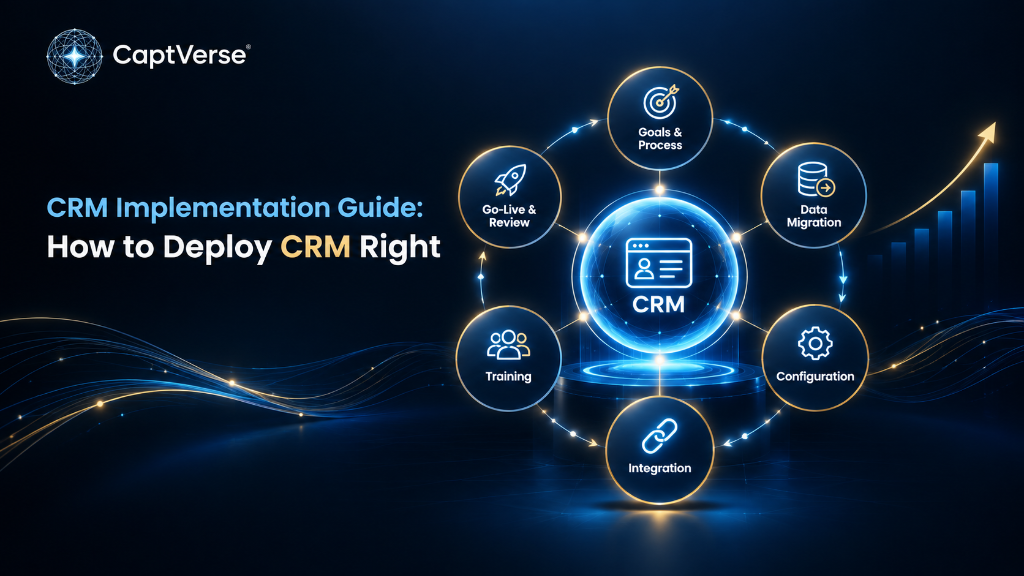
CRM implementation is the process of configuring, migrating data into, and rolling out a customer relationship management system so that sales, marketing, and support teams actually use it. Buying CRM software is a purchasing decision; implementing it is an operational project with its own phases, risks, and success criteria, and the two are often confused.
A successful CRM implementation follows a structured sequence: goal-setting, data migration, configuration, integration, training, and post-launch review. Skipping any phase, particularly training and change management, is the most common reason deployments stall or get abandoned. This guide breaks down each phase, sets realistic timelines by business size, and outlines the practices that separate a CRM rollout that gets adopted from one that becomes expensive shelfware.
Key Takeaways
- CRM implementation is a distinct project phase that comes after purchasing CRM software, not an automatic result of it.
- A structured implementation process has six phases: goal-setting, data migration, configuration, integration, training, and post-launch review.
- Poor user adoption, not faulty software, is the leading cause of failed CRM deployments.
- By 2027, 89 percent of large enterprises in North America are expected to have adopted some form of CRM software, up from 80 percent in 2023, according to Gartner.
- Change management determines outcomes as much as configuration does; McKinsey research on organizational transformation found that only about 30 percent of transformation efforts succeed in improving and sustaining performance.
- Realistic implementation timelines range from two to six weeks for a small sales team to several months for a multi-branch or multi-department rollout.
- Measuring implementation success requires adoption metrics, not just go-live dates: login frequency, data completeness, and pipeline coverage matter more than deployment speed.
- CaptCRM is built to shorten implementation timelines with native SLA policies, role-based access, and integrations that do not require custom development.
What Is CRM Implementation?
CRM implementation is the structured process of configuring a CRM platform, migrating existing customer data into it, connecting it to other business tools, and training staff so the system reflects how the business actually sells and provides support. It covers everything between signing a contract and having a sales or service team working productively inside the new system.
Implementation is often underestimated because the software purchase feels like the hard decision. In practice, the configuration and change management work after purchase determines whether the CRM platform gets used at all. A CRM deployment that skips proper data cleanup or user training tends to fail regardless of how capable the underlying software is.
Why CRM Implementations Fail: The Business Problem
CRM implementations most often fail because of poor user adoption, not because of missing features or software defects. When reps see the system as extra data entry rather than a tool that helps them sell, they revert to spreadsheets and personal notes, and the CRM platform becomes an incomplete, unreliable record.
This matters because CRM adoption is no longer optional for competitive businesses. Gartner projects that by 2027, 89 percent of large enterprises in North America will have adopted some form of CRM software, up from 80 percent in 2023, which means most competitors are already running some system, whether or not it is being used well [1].
The deeper issue is change management, not technology selection. McKinsey's research on organizational transformation found that only about 30 percent of transformation efforts succeed in both improving performance and sustaining that improvement, a figure that has stayed roughly constant across years of study [2]. CRM deployments are a form of operational transformation, and they fail for the same reasons: unclear goals, insufficient training, and a rollout treated as an IT task instead of a business change.
The business impact of a failed implementation is concrete: wasted software spend, incomplete pipeline data that misleads forecasting, and a sales team that trusts the CRM platform even less the next time a new tool is introduced.
The CRM Implementation Process: Six Phases
A CRM implementation process moves through six phases, in sequence, from defining goals to reviewing results after go-live. Treating these as sequential rather than skippable is what separates deployments that get adopted from ones that stall.
- Goal-setting and process mapping: define what the CRM needs to fix, such as slow follow-ups or lost leads, and map the current sales or service process before configuring anything.
- Data audit and migration planning: review existing customer data for duplicates and gaps, and decide what gets migrated versus archived, before importing anything into the new system.
- Configuration: set up pipeline stages, SLA policies, user roles, and permissions to match the process mapped in phase one, not a generic template.
- Integration: connect the CRM platform to email, payment, messaging, and inventory systems so data flows automatically instead of requiring manual re-entry.
- Training and change management: train users on daily workflows relevant to their role, and communicate why the change is happening, not just how to click through the interface.
- Go-live and post-launch review: launch with a defined support plan for the first weeks, then review adoption metrics at 30, 60, and 90 days and adjust configuration based on real usage.
CRM Implementation Best Practices
CRM implementation best practices reduce the risk of the failure patterns described above by keeping the rollout tied to a real business process instead of a generic checklist. The following practices apply across company sizes and industries.
- Assign a single implementation owner who is accountable for adoption metrics, not just the go-live date.
- Migrate only clean data: deduplicate contacts and standardize fields before import, since bad data undermines trust in the system from day one.
- Configure pipeline stages around the actual sales process, not a vendor's default template.
- Set SLA policies (maximum response times by source or priority) before go-live, so follow-up discipline is built in rather than added later.
- Roll out to one team first, gather feedback, then expand, rather than deploying company-wide on day one.
- Tie training to specific roles: a sales rep and a support agent need different walkthroughs, not one generic session.
- Review adoption data at 30, 60, and 90 days, and treat the first quarter as a tuning period, not a finished project.
Common CRM Implementation Mistakes to Avoid
Most CRM implementation mistakes fall into a small number of repeatable patterns, and avoiding them matters more than any single feature choice. These mistakes explain most of the failure rate discussed earlier.
- Migrating data without cleaning it first, which carries duplicate and outdated records into the new system.
- Configuring pipeline stages that mirror the software vendor's demo instead of the business's actual sales process.
- Treating training as a single onboarding session instead of an ongoing part of the rollout.
- Rolling out to every department at once, instead of piloting with one team and adjusting based on feedback.
- Skipping SLA and automation configuration, leaving follow-up discipline dependent on individual reps remembering to act.
- Measuring success only by whether the system is live, rather than by adoption metrics like login frequency and data completeness.
CRM Implementation Timeline: What to Expect
CRM implementation timelines vary by company size and process complexity, ranging from a few weeks for a single sales team to several months for a multi-branch or multi-department rollout. The table below sets realistic expectations by scenario.
| Business Scenario | Typical Timeline | Main Driver of Duration |
|---|---|---|
| Small sales team, single pipeline | 2 to 4 weeks | Minimal data migration and few integrations |
| Mid-size business, sales plus service desk | 6 to 10 weeks | SLA configuration and cross-team training |
| Multi-branch operation | 2 to 4 months | Branch-level data scoping and role setup |
| Enterprise, multiple departments and systems | 4 to 9 months | Custom integrations and phased department rollout |
How to Measure CRM Implementation Success
CRM implementation success is measured by adoption and data quality metrics, not by whether the system technically went live. A CRM platform that is live but underused provides little more value than the spreadsheets it replaced.
- Login frequency: are reps and agents using the system daily, or only when a manager asks for an update.
- Data completeness: what percentage of open opportunities have accurate stage, value, and next-action fields filled in.
- SLA compliance rate: what percentage of inquiries receive a first response within the defined time window.
- Pipeline coverage: are deals being logged as they happen, or backfilled in bulk before review meetings.
- Time to first value: how many weeks after go-live did the team report the system helping rather than slowing them down.
Industry Examples of CRM Implementation
CRM implementation looks different depending on the industry's data sensitivity, sales cycle, and regulatory requirements. The following scenarios illustrate how the same six-phase process adapts to different business contexts.
- Manufacturing: implementation focuses on connecting dealer and distributor inquiries to stock and order data, so quotes reflect real inventory.
- Automotive: rollout typically prioritizes linking vehicle sales records to service reminders, since retention depends on that connection.
- Banking: implementation requires early attention to role-based access and audit logging, given regulatory data handling requirements.
- Insurance: configuration centers on renewal and claims tracking alongside new business, since all three compete for agent attention.
- Healthcare: data migration needs particular care around patient contact records and consent tracking before go-live.
- Retail: integration with point-of-sale and online order data is usually the critical path, more than pipeline configuration.
- Government: implementation timelines often extend due to procurement and compliance review, even when the technical configuration is straightforward.
How CaptCRM Supports a Smooth Implementation
The phases and practices above apply to any CRM platform. CaptCRM is built to reduce the specific friction points that most often derail implementation: it includes SLA policies, role-based access, and branch scoping as configuration options rather than custom development work, which shortens the configuration phase described earlier.
It also connects natively to CaptStock, CaptPay, CaptChat, and CaptVoice, so integration work that would otherwise require custom API development is largely a matter of enabling the relevant module. For teams evaluating a CRM deployment, that native integration is worth testing directly against your own data during a demo, rather than assumed from a feature list.
FAQ
How long does CRM implementation usually take?
It depends on scope. A single sales team with clean data can go live in two to four weeks, while a multi-branch or multi-department rollout with custom integrations typically takes two to six months, driven mainly by data migration and cross-team training.
What is the biggest cause of CRM implementation failure?
Poor user adoption is the most common cause, usually driven by unclean data, generic configuration that ignores the real sales process, and one-time training instead of ongoing support. The software itself is rarely the primary reason a deployment fails.
Should we migrate all historical data during implementation?
No. Migrate active contacts, open opportunities, and recent history that reps need day one, and archive or exclude outdated records. Importing unclean or irrelevant data undermines trust in the new system from the start.
Do we need a dedicated project manager for CRM implementation?
Yes, for any rollout beyond a small team. A single accountable owner keeps the six implementation phases on track and prevents the rollout from being treated as a side task with no clear deadline or success metric.
How do we know if our CRM implementation succeeded?
Track adoption metrics at 30, 60, and 90 days: login frequency, data completeness, and SLA compliance rate. A technically live system with low daily usage has not succeeded, regardless of the go-live date.
Conclusion
CRM implementation is a distinct project with its own risks, separate from the decision to buy CRM software in the first place. The businesses that succeed treat it as a structured, six-phase process: clear goals, clean data, configuration built around the real sales process, working integrations, role-specific training, and a post-launch review period, not a single go-live event.
The evidence is consistent: adoption, not features, determines whether a CRM deployment delivers value. Businesses planning a rollout should build their timeline and success metrics around adoption from day one, and evaluate any CRM platform, including CaptCRM, against how much implementation friction it removes for their specific process.
To see how CaptCRM handles data migration, SLA configuration, and integrations for your specific sales process, book a demo with the CaptCRM team.