
What Is CRM Software? Features, Benefits & Business Use Cases
Captverse · September 2, 2026 · 11 min read
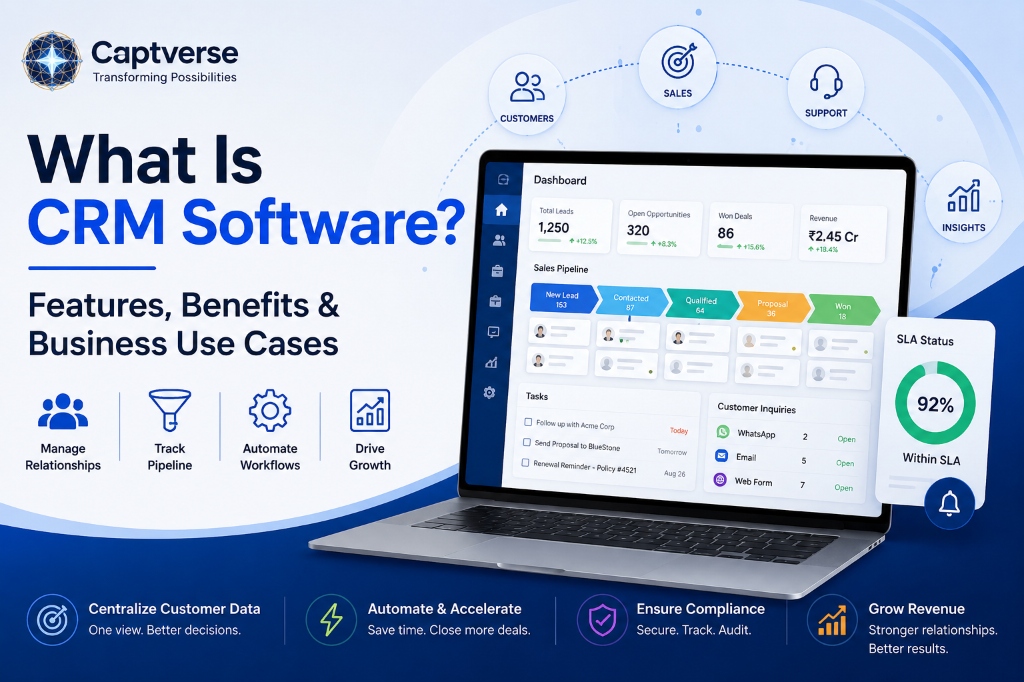
Customer relationship management (CRM) software gives sales, marketing, and support teams a single system to track every customer interaction, from first inquiry to closed deal to ongoing support request. Organizations without a CRM platform often rely on spreadsheets, email threads, and disconnected tools, which leads to lost leads, delayed follow-ups, and inconsistent service.
CRM software solves this by centralizing customer data, automating routine sales tasks, and giving managers visibility into pipeline performance. Core capabilities include contact and lead management, sales pipeline tracking, workflow automation, reporting, and customer service tools. Businesses that adopt a sales CRM typically see faster response times, better forecast accuracy, and measurable productivity gains across sales and support teams.
Key Takeaways
- CRM software centralizes customer, sales, and support data in one system, replacing spreadsheets and disconnected tools.
- Core CRM features include contact management, sales pipeline tracking, workflow automation, reporting, and service ticketing.
- A sales CRM helps teams respond to inquiries faster, forecast more accurately, and reduce lead loss.
- CRM software applies across industries, including manufacturing, banking, insurance, healthcare, retail, and government.
- The global CRM software market reached 128 billion US dollars in 2024, up 13.4 percent from the prior year, according to Gartner.
- Companies that apply sales-behavior data, a core CRM reporting capability, see an average productivity improvement of 20 percent, according to McKinsey.
- Choosing a CRM platform depends on business size, sales process complexity, integration needs, and data security requirements.
- CaptCRM is one example of a CRM platform built with SLA tracking, a native service desk, and quote-to-order tools included.
What Is CRM Software?
CRM software, or customer relationship management software, is a system that stores customer and prospect information, tracks sales activity, and manages communication across every stage of the customer lifecycle. It replaces scattered spreadsheets and email chains with one record per contact, so sales, marketing, and support teams work from the same information.
The term "CRM" refers both to the strategy of managing customer relationships systematically and to the software category that supports it. A CRM platform typically tracks three things: who the customer or prospect is, what interactions have taken place with them, and where they stand in the sales or support process.
Most CRM software falls into three broad categories, depending on what the system is optimized to do.
| CRM Type | Primary Function | Typical Users |
|---|---|---|
| Operational CRM | Manages day-to-day sales, marketing, and service processes such as lead capture and follow-ups | Sales reps, support agents |
| Analytical CRM | Analyzes customer data to identify trends, forecast revenue, and score leads | Sales managers, analysts |
| Collaborative CRM | Shares customer information across departments, such as sales and support | Cross-functional teams |
Why Businesses Need Customer Relationship Management Software
Businesses need customer relationship management software because manual tracking methods cannot keep pace with the volume and complexity of modern customer interactions. When inquiries arrive through multiple channels and get recorded in different tools, follow-ups get missed and customer context gets lost between departments.
This problem shows up differently across industries, but the root cause is the same: data that lives in silos instead of one shared system.
- Manufacturing: distributors and dealers submit inquiries by phone, email, and web forms, and sales teams struggle to track which quotes are still open.
- Automotive: dealerships lose track of service reminders and trade-in leads once a sale closes, missing repeat business opportunities.
- Banking: relationship managers need a full view of a customer's products and service history before every call, which spreadsheets cannot provide reliably.
- Insurance: agents handle policy renewals, claims, and new business leads together, and a missed renewal reminder directly affects retention.
- Healthcare: patient intake and follow-up scheduling require accurate contact records and audit trails for compliance reasons.
- Retail: customer purchase history across online and in-store channels needs to stay connected to support personalized offers and service.
- Government: citizen service requests need a documented, auditable trail from submission to resolution.
In each case, the business impact of not having a connected system is the same: slower response times, inconsistent service, and lost revenue from leads or renewals that fall through the cracks.
Core Features of CRM Software
The core features of CRM software cover four areas: capturing customer data, managing the sales process, automating routine work, and reporting on performance. Most CRM platforms include the following capabilities, though the depth of each varies by vendor and pricing tier.
- Contact and lead management: stores customer and prospect details in one searchable record, with deduplication to prevent duplicate entries.
- Sales pipeline and opportunity tracking: visualizes deals by stage, typically on a Kanban-style board, so managers can see what is in progress.
- Workflow automation: triggers tasks, reminders, and status updates automatically based on rules, reducing manual data entry.
- Service level agreement (SLA) tracking: an SLA is a defined maximum response time; CRM software can flag inquiries that are at risk of missing this deadline and escalate them automatically.
- Reporting and dashboards: summarizes conversion rates, response times, and rep performance for managers without manual data exports.
- Customer service or ticketing: tracks post-sale support requests and links them to the customer's sales history.
- Omnichannel communication: consolidates messages from email, phone, and messaging apps such as WhatsApp into one thread per customer.
- Quote and proposal generation (CPQ): builds and sends price quotes directly from an opportunity record.
- Role-based access and audit trails: restricts data visibility by role and logs changes for compliance review.
- Integrations: connects the CRM platform to email, payment, inventory, and marketing tools already in use.
Benefits of Using a CRM Platform
The benefits of using a CRM platform center on measurable business outcomes: lower operational cost, faster processing, better compliance, reduced risk, higher productivity, and improved customer experience. These outcomes follow directly from replacing manual, fragmented processes with one connected system.
- Reduced operational cost: consolidating multiple point tools (spreadsheets, a separate helpdesk, a separate quoting tool) into one platform lowers software and administrative overhead.
- Faster processing: automated assignment and SLA tracking mean inquiries reach a rep and get a response sooner.
- Improved compliance: audit trails and role-based access support data governance requirements in regulated industries such as banking and healthcare.
- Lower business risk: deduplication and centralized records reduce the chance of data loss when an employee leaves or a lead is handled by multiple reps.
- Increased productivity: sales teams that use structured data to guide seller behavior see meaningful productivity gains. McKinsey research on B2B sales organizations found that companies applying sales-behavior insights to guide rep activity achieved an average productivity improvement of 20 percent [1].
- Better customer experience: a shared customer record means any team member can answer a question accurately, without transferring the customer between departments.
Demand for these outcomes is reflected in market growth. The global CRM software market reached 128 billion US dollars in 2024, growing 13.4 percent over the previous year, according to Gartner research on customer experience and relationship management software [2].
Business Use Cases of CRM Software Across Industries
Business use cases for CRM software vary by industry, but they share a common pattern: connecting customer data to a specific operational process that was previously manual. The table below outlines representative use cases and the outcome each one targets.
| Industry | Use Case | Business Outcome |
|---|---|---|
| Manufacturing | Track dealer and distributor inquiries through quote and order stages | Fewer stalled quotes, clearer channel visibility |
| Automotive | Link vehicle sales to service reminders and trade-in follow-ups | Higher repeat business and service retention |
| Banking | Give relationship managers a full product and interaction history per client | Faster, more relevant client conversations |
| Insurance | Track policy renewals, claims, and new business leads in one pipeline | Reduced missed renewals and improved retention |
| Healthcare | Manage patient intake, follow-up scheduling, and communication logs | Improved appointment adherence and audit readiness |
| Retail | Connect online and in-store purchase history to support and offers | More consistent, personalized service |
| Government | Log citizen service requests from submission to resolution | Documented, auditable service delivery |
Sales CRM vs. Full CRM Platform: What Is the Difference?
A sales CRM focuses narrowly on pipeline management: tracking leads, opportunities, and deal stages for a sales team. A full CRM platform extends beyond sales to include marketing automation, customer service, and sometimes billing or inventory, so multiple departments share one system instead of separate tools.
The right choice depends on scope. A business that only needs to manage a sales pipeline may start with a sales CRM. A business that also wants to unify support, quoting, and payments typically needs a broader CRM platform, since passing data between separate systems introduces delays and errors.
How to Choose the Right CRM Software
Choosing the right CRM software starts with mapping your current sales and service process before comparing vendors. The following framework covers the criteria that most affect long-term fit.
- Map your current pipeline stages and identify where inquiries currently get lost or delayed.
- List the systems the CRM must connect to, such as email, payment processing, inventory, or messaging channels.
- Define your compliance and data security requirements, including encryption, access control, and audit logging.
- Compare deployment options and pricing structures, including per-user cost and add-on modules such as a service desk or CPQ.
- Run a pilot with one team before a full rollout, and measure adoption, not just feature checklists.
How to Implement CRM Software: Step-by-Step
Implementing CRM software successfully depends more on process and data quality than on the software itself. The following steps apply to most implementations, regardless of company size.
- Clean and migrate existing customer data, removing duplicates before import rather than after.
- Configure pipeline stages, SLA policies, and user roles to match your actual sales and service process.
- Connect communication channels, such as email and messaging apps, so inquiries flow into the system automatically.
- Train sales and support teams on daily workflows, not just system features, so adoption sticks.
- Monitor adoption and pipeline metrics in the first 90 days, and adjust SLA rules or stages based on real usage.
Where a Platform Like CaptCRM Fits In
The features and benefits described above are the criteria most businesses use to evaluate CRM software. CaptCRM is one example of a CRM platform built around these requirements: it tracks inquiries, contacts, opportunities, and customers in one pipeline, with SLA policies that flag inquiries at risk of missing a response deadline.
It also includes a native service desk for post-sale support, a unified inbox for WhatsApp and other messaging channels, and quote-to-order tools, so sales and service teams work from the same customer record instead of switching between separate systems. For businesses evaluating a sales CRM, these are the categories worth testing directly with your own pipeline data during a demo.
FAQ
What is the difference between CRM software and a CRM platform?
The terms are often used interchangeably. "CRM software" typically refers to the tool itself, while "CRM platform" implies a broader system that connects sales, marketing, and service functions together, sometimes with added modules like billing or inventory.
Is CRM software only useful for large businesses?
No. Small and mid-sized businesses often see faster returns, since manual tracking breaks down sooner at lower headcounts. A CRM platform helps a five-person sales team stay organized just as much as a five-hundred-person one.
How much does CRM software cost?
Pricing usually follows a per-user, per-month model, with cost varying based on features included, such as automation, service desk, or CPQ modules. Add-on modules and enterprise tiers typically cost more than a base sales pipeline plan.
Can CRM software integrate with tools we already use?
Most CRM platforms support integrations with email, payment processors, messaging apps, and inventory systems, either natively or through an API. Confirm specific integrations during evaluation rather than assuming compatibility.
Is customer data secure in cloud-based CRM software?
Reputable CRM vendors encrypt data at rest and in transit, and support role-based access to limit who can view sensitive records. Ask vendors directly about encryption standards, access controls, and audit logging before selecting a platform.
Conclusion
CRM software addresses a specific, recurring business problem: customer and sales data that lives in disconnected tools, causing missed follow-ups and inconsistent service. A sales CRM built around pipeline tracking, SLA management, and shared customer records replaces that fragmentation with one governed system.
The business case is measurable: faster response times, better forecast accuracy, and productivity gains that compound across a sales and service team. Businesses evaluating a CRM platform should map their own pipeline first, then test candidate systems, including CaptCRM, against that real process rather than a generic feature list.
To see how CaptCRM handles your specific pipeline, SLA rules, and service workflows, book a demo with the CaptCRM team.
References
- McKinsey & Company, How data analytics helps sales reps win more deals.
- Gartner, Market Share: Customer Experience and Relationship Management, Worldwide, 2024.