
CRM vs Spreadsheet: Which Is Better for Sales Teams
Captverse · September 14, 2026 · 11 min read
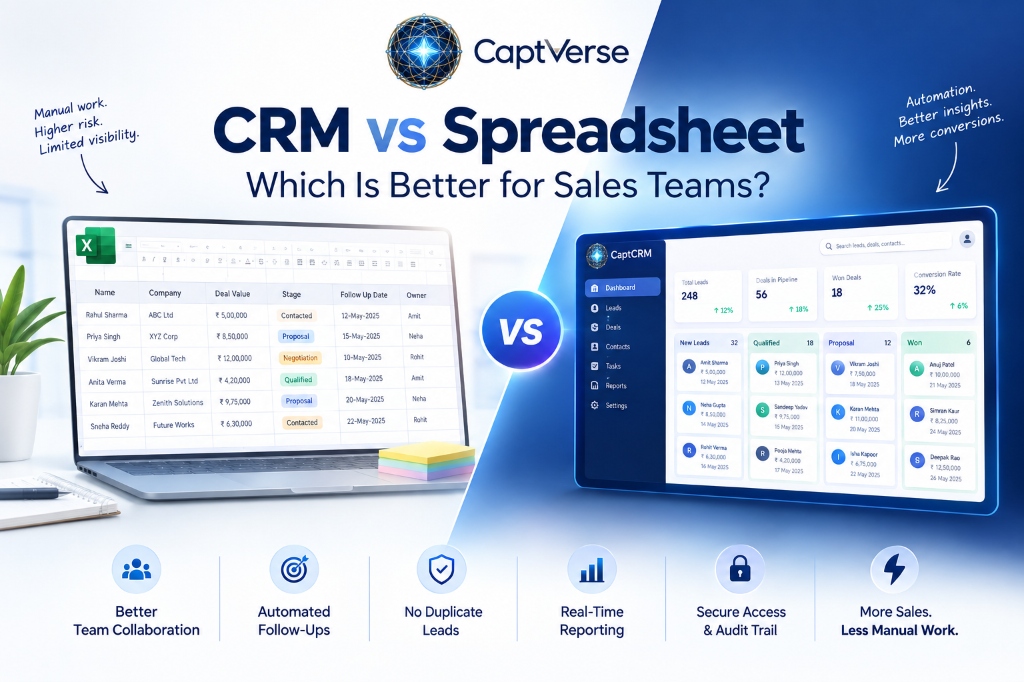
CRM vs spreadsheet is a common decision point for growing sales teams: a CRM (customer relationship management system) tracks leads and deals in a structured, automated system, while a spreadsheet relies on manual entry in rows and columns with no built-in workflow. Spreadsheets work well for very small teams with few deals, but they lose reliability as headcount, deal volume, and channel complexity increase.
This comparison covers where spreadsheets genuinely work, where they break down for sales tracking, and the specific capabilities a CRM adds that a spreadsheet cannot replicate on its own, such as automated follow-up reminders and deduplication. It closes with a practical framework for deciding which option fits a given sales team's current stage.
Key Takeaways
- A CRM automates lead tracking, follow-up reminders, and deduplication; a spreadsheet requires manual entry and manual checking for all three.
- Spreadsheets work adequately for a single rep or a very small team with low deal volume and no need for shared, real-time visibility.
- Spreadsheets break down once multiple reps update the same file, since version conflicts and manual errors become common at that point.
- Over a quarter of organizations estimate they lose more than 5 million US dollars annually due to poor data quality, according to IBM, a risk spreadsheets amplify through manual entry.
- Gartner projects that 89 percent of large enterprises in North America will have adopted some form of CRM software by 2027, up from 80 percent in 2023.
- Core CRM benefits over spreadsheets include automated SLA tracking, a shared customer record, and reporting without manual data exports.
- The right choice depends on team size, deal volume, and whether multiple people need real-time visibility into the same pipeline.
- CaptCRM replaces spreadsheet-based tracking with a structured pipeline, SLA policies, and deduplication built in from day one.
CRM vs Spreadsheet: What Is the Core Difference?
The core difference in CRM vs spreadsheet is automation: a CRM is a system purpose-built to track leads, deals, and customer interactions with rules that run automatically, while a spreadsheet is a general-purpose grid that requires a person to enter, update, and check every value by hand. A CRM enforces structure; a spreadsheet depends on the discipline of whoever is using it.
Both tools can technically hold the same information: contact names, deal stages, deal values, follow-up dates. The difference shows up in what happens when that information needs to update automatically, be checked for duplicates, or be shared reliably across a growing team.
Why Sales Teams Start With Spreadsheets
Sales teams start with spreadsheets because they are immediately available, familiar, and free with tools most businesses already have, such as Excel or Google Sheets. For a founder or a single rep tracking a handful of deals, a spreadsheet is often genuinely the right tool, not a compromise.
This is a reasonable starting point, not a mistake. The problem is not that spreadsheets are inherently bad for sales tracking; it is that most teams keep using them well past the point where the format can support the volume and complexity of the sales process. The pain shows up gradually, not all at once, which is part of why it goes unaddressed for so long.
Where Spreadsheets Break Down for Sales Tracking
Spreadsheets break down for sales tracking once multiple reps need to update the same data, since conflicting edits, accidental overwrites, and stale copies become common at that point. A spreadsheet has no way to enforce that two people are not editing the same deal at once, or that a lead is not entered twice by two different reps.
- No deduplication: the same lead can be entered multiple times with no automatic check against existing records.
- No automated reminders: follow-up dates sit in a column, but nothing alerts a rep when a deadline passes.
- Version conflicts: shared spreadsheets edited by multiple people frequently produce overwritten or lost updates.
- Manual reporting: pipeline totals, conversion rates, and rep performance require manual formulas or exports, which are easy to get wrong.
- No access control: anyone with the file can see or edit every record, with no way to restrict visibility by role or branch.
- No audit trail: there is typically no record of who changed a value or when, which matters for compliance-sensitive industries.
CRM vs Spreadsheet: Feature Comparison
The table below compares CRM and spreadsheet-based sales tracking directly across the capabilities that matter most as a sales team grows.
| Capability | Spreadsheet (Excel or Sheets) | CRM Platform |
|---|---|---|
| Lead deduplication | Manual check, error-prone at volume | Automatic matching by phone or email |
| Follow-up reminders | None, relies on memory or a separate calendar | Automated SLA alerts on defined timelines |
| Multi-user editing | Prone to version conflicts and overwrites | Real-time updates with no conflict risk |
| Access control | File-level only, no field or role restriction | Role-based permissions by user or branch |
| Reporting | Manual formulas or exports required | Built-in dashboards, no export needed |
| Audit trail | Not typically available | Logged changes with timestamp and user |
| Cost at small scale | Free with existing tools | Per-user subscription cost |
The Business Cost of Sticking With Spreadsheets Too Long
The business cost of sticking with spreadsheets past the point they can support a growing sales team shows up as data quality problems that compound over time: duplicate records, missed follow-ups, and unreliable reports that leadership stops trusting. These are not hypothetical risks; they reflect a documented, broader pattern in how manual data processes affect businesses.
IBM's research on data quality found that over a quarter of organizations estimate they lose more than 5 million US dollars annually due to poor data quality, with 7 percent reporting losses of 25 million US dollars or more [1]. Manual, unstructured tools like spreadsheets are a common source of the errors behind these figures, since they depend entirely on individual discipline rather than system-enforced accuracy.
For a sales team specifically, this translates into duplicate outreach, missed renewals, and pipeline reports that do not reflect reality, all of which cost revenue directly rather than through abstract data governance concerns.
In addition, Gartner projects that 89 percent of large enterprises in North America will have adopted some form of CRM software by 2027, up from 80 percent in 2023 [2], reflecting the industry-wide shift toward structured customer data systems.
Core CRM Benefits Over Spreadsheets
The core CRM benefits over spreadsheets center on removing manual work and enforcing consistency that a spreadsheet cannot provide on its own, regardless of how well-organized the file is. These benefits become more valuable as team size and deal volume grow.
- Automated follow-up tracking: SLA policies flag deals or leads at risk of going untouched, without a manager needing to check manually.
- Deduplication by default: new leads are checked against existing records automatically, preventing duplicate outreach.
- Shared, real-time visibility: every rep and manager sees the same live data, with no risk of working from an outdated copy.
- Role-based access: sensitive customer data can be restricted by role or branch, supporting compliance needs a spreadsheet cannot enforce.
- Built-in reporting: pipeline value, conversion rates, and rep performance are available without manual formulas or exports.
- Audit trails: changes are logged with a timestamp and user, which matters for regulated industries like banking and insurance.
When a Spreadsheet Is Still Enough
A spreadsheet is still enough for a sales tracking need when the team is very small, deal volume is low, and only one or two people need to view or edit the data. In these cases, the overhead of setting up and paying for a CRM platform may outweigh the benefit, at least temporarily.
- A single founder or rep managing fewer than roughly 20 to 30 active deals at a time.
- No requirement for real-time, shared visibility across multiple people.
- No compliance requirement for access control or audit logging on customer data.
- A short-term or pilot sales motion that may not continue past a few months.
How to Decide: CRM or Spreadsheet for Your Sales Team
Deciding between a CRM and a spreadsheet comes down to a small number of concrete questions about team size, deal volume, and compliance needs, evaluated honestly rather than based on which tool feels more familiar. The following framework covers the main decision points.
- Count how many people need to view or edit the same pipeline data regularly; more than two or three people signals a CRM is likely needed.
- Estimate current deal or lead volume; spreadsheets typically become unreliable above a few dozen active records per person.
- Check whether your industry has compliance requirements around access control or audit trails on customer data.
- Ask whether missed follow-ups have already cost a deal; if so, the cost of the status quo is measurable, not hypothetical.
- Weigh the per-user CRM cost against the estimated cost of the specific spreadsheet failures already happening, rather than against zero.
Migrating From Spreadsheet to CRM: What to Expect
Migrating from a spreadsheet to a CRM follows a short, predictable sequence for most small and mid-size sales teams, typically completed faster than a full enterprise CRM rollout since there is less legacy data to reconcile.
- Clean the spreadsheet first: remove duplicate rows and standardize inconsistent fields, such as phone number formats, before import.
- Map spreadsheet columns to CRM fields, deciding which columns become required fields versus optional notes.
- Import in a test batch first, checking that deduplication and field mapping worked correctly before importing the full file.
- Configure pipeline stages and SLA policies to match the sales process the spreadsheet was tracking, not a generic default.
- Retire the spreadsheet fully, rather than running both in parallel indefinitely, which reintroduces the version-conflict problem.
Industry Examples: CRM vs Spreadsheet in Practice
The point at which spreadsheets stop working varies by industry, largely based on deal complexity and compliance requirements. The following examples illustrate common patterns.
- Manufacturing: distributor quote tracking in spreadsheets typically breaks down once multiple regional reps submit updates to the same file.
- Automotive: trade-in and financing details are prone to version conflicts in shared spreadsheets during active negotiation.
- Banking: compliance requirements around access control and audit trails usually rule out spreadsheets for client data entirely.
- Insurance: renewal tracking in spreadsheets often misses deadlines since there is no automated alert when a policy nears expiration.
- Healthcare: patient contact data in spreadsheets raises both accuracy and compliance concerns as record volume grows.
- Retail: wholesale account tracking across multiple reps hits the same multi-user conflict problem seen in manufacturing.
- Government: audit and documentation requirements for citizen service requests generally exceed what spreadsheets can support.
Where CaptCRM Fits Into This Decision
The capabilities that separate a CRM from a spreadsheet, deduplication, automated follow-up, and shared real-time visibility, are the specific gaps CaptCRM is built to close for a growing sales team moving off manual tracking. It captures leads from multiple channels into one deduplicated pipeline, with SLA policies that flag deals before they go cold.
It also retains the visual, stage-based structure that makes a spreadsheet's Kanban-style layout familiar, so the switch does not require reps to learn an entirely different way of thinking about their pipeline. For teams evaluating this move, testing import and deduplication against an actual spreadsheet export during a demo is the clearest way to judge fit.
FAQ
Is a CRM always better than a spreadsheet for sales tracking?
Not always. For a single rep or a very small team with low deal volume, a spreadsheet can work fine. A CRM becomes clearly better once multiple people need shared, real-time visibility or when manual tracking has already caused missed follow-ups.
What is the biggest risk of using Excel for sales tracking?
The biggest risk is silent data decay: duplicate leads, missed follow-up dates, and version conflicts that nobody notices until a deal is already lost. Excel has no built-in way to flag these problems as they happen.
How long does it take to migrate from a spreadsheet to a CRM?
For a small sales team with a reasonably clean spreadsheet, migration typically takes one to three weeks, including data cleanup, import, and pipeline configuration. Larger or messier spreadsheets take longer mainly due to deduplication work.
Can a CRM replace Excel completely for a sales team?
Yes, for pipeline and lead tracking specifically. Some teams still use spreadsheets for one-off analysis or reporting exports, but day-to-day deal tracking and follow-up management are handled more reliably inside a CRM.
Do small businesses really need a CRM instead of a spreadsheet?
It depends on deal volume and team size, not business size alone. A small business with a handful of deals per month may not need one yet, but the need typically arrives sooner than expected once more than one person is selling.
Conclusion
CRM vs spreadsheet is not a question of one tool being universally better than the other; it is a question of fit at a given team's current size and deal volume. Spreadsheets are a reasonable starting point for a single rep with a handful of deals, but they lose reliability once multiple people need shared, real-time visibility, since nothing in a spreadsheet enforces deduplication, follow-up timing, or access control.
The cost of staying with spreadsheets too long is measurable, not abstract: duplicate outreach, missed follow-ups, and pipeline reports leadership stops trusting. Sales teams weighing this decision should count active deals, count the people who need shared visibility, and check whether missed follow-ups have already cost a deal, then evaluate a CRM platform, including CaptCRM, against that specific gap rather than a generic feature list.
To see how CaptCRM handles a real spreadsheet import and pipeline setup for your sales process, book a demo with the CaptCRM team.